There is a file 2A3A8A6D6826EF6CC653030E7D695C41.zip in the folder C:\Users\[User Name]\AppData\Local\Xamarin\zips that downloads the first time you compile a Xamarin forms android app. If this file does not download properly you get 55 errors about missing resources on the android project. Deleting the file from the folder will cause it to download again when compiling which resolves the resource missing errors. The file size at the time of this posting should be 220K some people with the issue had a file size of about 16K
It would be nice if Xamarin had a better notification if this file does not download properly.
Sunday, September 11, 2016

Saturday, August 6, 2016
How to enable long file names in windows 10
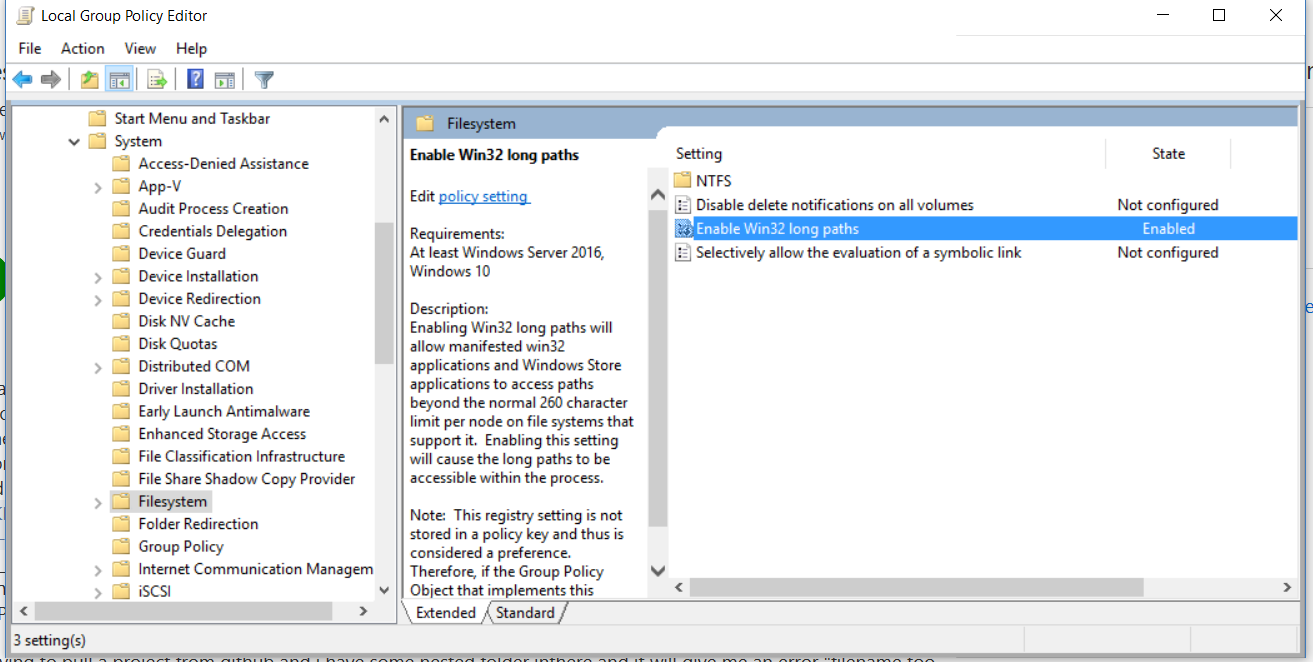
If you have the Anniversary update windows 10 pro or greater you can enable long file names in group policy.
Search for group policy editor and open it up. Under local computer policy --> Computer Configuration --> Administrative Templates --> System --> File System you will find Enable Win32 Long Paths set it to enabled.
Wednesday, April 6, 2016
NuGet does not show packages after Visual Studio 2015 Update 2
I recently updated my computer to have Visual Studio 2015 Update 2 and the anniversary sdk ctp for windows 10. I noticed I no longer was seeing any packages when I tried to add a nuget package. It turns out the url which goes at the top of the package locations was missing. Once I added it back everything worked fine.

Sunday, April 3, 2016
FreshMVVM getting started the missing step
I have been playing around with FreshMVVM and found I like it a lot. It is very light weight and fairly easy to use.
There is one thing missing from the FreshMVVM quick start that I felt should blog about. You need to put everything in a fresh navigation container if you want the pages and page models to resolve and of course be able to navigate.
http://www.michaelridland.com/xamarin/freshmvvm-quick-start-guide/
In the app class this is how you need to set MainPage to an instance to show the first page.
There is one thing missing from the FreshMVVM quick start that I felt should blog about. You need to put everything in a fresh navigation container if you want the pages and page models to resolve and of course be able to navigate.
http://www.michaelridland.com/xamarin/freshmvvm-quick-start-guide/
In the app class this is how you need to set MainPage to an instance to show the first page.
    public App()
    {
        // The root page of your application
        var homePage = FreshMvvm.FreshPageModelResolver.ResolvePageModel<HomePageModel>();
        var navConatiner = new FreshMvvm.FreshNavigationContainer(homePage);
        MainPage = navConatiner;
    }
Monday, December 28, 2015
Ensure that this project has Microsoft.Bcl.Build installed and packages.config is located next to the project file
I received this error while building a UWP app.
Could not locate xxxx\packages.config. Ensure that this project has Microsoft.Bcl.Build installed and packages.config is located next to the project file.
I did check and see the package.config in the right directory and I did have Microsoft.BCL.Build. The only way to get this to work is to close visual studio delete the obj folder in the solutions directory. Once the obj folder is deleted and I reloaded the project in visual studio everything worked again.
Could not locate xxxx\packages.config. Ensure that this project has Microsoft.Bcl.Build installed and packages.config is located next to the project file.
I did check and see the package.config in the right directory and I did have Microsoft.BCL.Build. The only way to get this to work is to close visual studio delete the obj folder in the solutions directory. Once the obj folder is deleted and I reloaded the project in visual studio everything worked again.
Thursday, December 3, 2015
Error : DEP1630 : Invalid "TargetOsVersion" property
I was trying to get the Wikipedia sample app for windows store 8 from GitHub to run in visual studio 2015. The app is a HTML app.
https://github.com/wikimedia/apps-win8-wikipedia
When trying to run the app I was getting the following error
DEP1630 : Invalid “TargetOsVersion” property
The solution was to edit the WikipediaMetroTest.jsproj with notepad and change the Visual studio version to 14.0
https://github.com/wikimedia/apps-win8-wikipedia
When trying to run the app I was getting the following error
DEP1630 : Invalid “TargetOsVersion” property
The solution was to edit the WikipediaMetroTest.jsproj with notepad and change the Visual studio version to 14.0
<VisualStudioVersion>14.0</VisualStudioVersion>
Saturday, November 7, 2015
Targeting Mobile only in a windows universal app
To make your UWP app only target windows 10 mobile add the following to your app manifest
https://msdn.microsoft.com/en-us/library/windows/apps/dn986903.aspx
<Dependencies>
   <TargetDeviceFamily Name="Windows.Mobile" MinVersion="10.0.x.0" MaxVersionTested="10.0.y.0"/>
</Dependencies>
https://msdn.microsoft.com/en-us/library/windows/apps/dn986903.aspx
Subscribe to:
Posts (Atom)
-
I find that sometime when I am debugging a Xamarin Forms apps on a windows 10 machine the android apps do not show the latest updates in the...
-
If you have the Anniversary update windows 10 pro or greater you can enable long file names in group policy. Search for group policy edit...
-
I have been wanting to learn how to develop software for Linux for a while. Now that Microsoft is has been making .net core work cross plat...
